
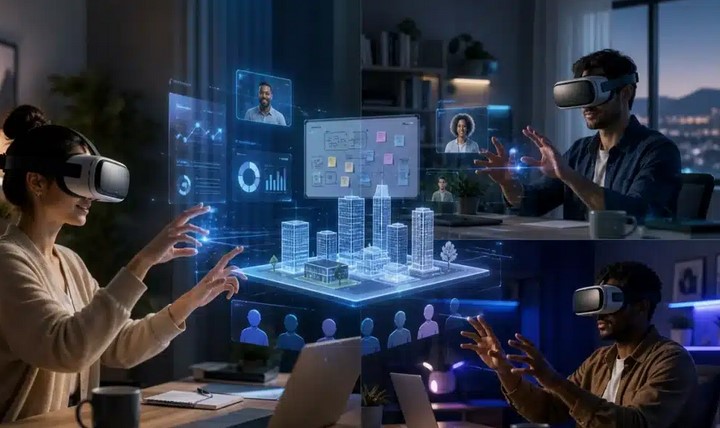
I remember the exact moment the “Zoom fatigue” hit me like a physical wall. It was late 2022, and I was staring at a grid of sixteen pixelated faces, feeling more disconnected than if I’d been working from a desert island. As someone who has spent over a decade at the intersection of health and technology, I knew this wasn’t just “laziness”—it was a cognitive overload caused by the lack of spatial awareness and non-verbal cues.
Then, I put on a headset. I wasn’t just looking at my colleagues; I was standing next to them in a virtual boardroom overlooking a digital Tokyo. We weren’t just icons; we were presences. That was the day I realized that VR platforms for business aren’t just a sci-fi gimmick—they are the final frontier of the remote work revolution.
Beyond the Screen: Why 2D Video Calls are Failing Us
We were never evolved to communicate through 2D boxes. When we interact in person, our brains process spatial audio and micro-expressions. In a standard video call, your brain works overtime to “fill in the gaps,” leading to exhaustion.
Virtual Reality (VR) solves this by providing Presence. Think of it like this: If a video call is like looking at a photo of a swimming pool, VR is like actually jumping into the water. You feel the depth, the scale, and the proximity of others. For businesses, this translates to higher retention of information and a massive boost in team empathy.
The Power Players: Exploring VR Platforms for Business
The market is no longer just about gaming. We are seeing a sophisticated ecosystem of platforms designed specifically for enterprise-grade security and productivity.
1. Meta Horizon Workrooms
Meta has poured billions into making this the “entry point” for businesses. It allows you to bring your physical desk and keyboard into the VR space.
-
Best for: Daily stand-ups and mixed-reality presentations.
-
The Vibe: A clean, futuristic office with great integration for Mac and PC.
2. Arthur
If Meta is the “open office,” Arthur is the high-end executive suite. It focuses on massive, persistent spaces where you can leave whiteboards up for months.
-
Best for: Complex project management and large-scale workshops.
-
The Vibe: Professional, expansive, and built for deep work.
3. Vive Sync
Developed by HTC, this platform prioritizes security and high-fidelity avatars. It integrates seamlessly with Microsoft Office 365, making it a favorite for traditional corporate structures.
-
Best for: Secure internal meetings and reviewing 3D assets.
The “Digital Twin” Analogy: Understanding VR Infrastructure
To explain VR platforms for business to my non-tech friends, I use the Digital Twin analogy.
Imagine your physical office has a ghost—a perfect digital replica that exists in the cloud. This “twin” doesn’t care about geography. Your lead designer in London and your dev team in Jakarta can walk into the same room, pick up the same virtual marker, and draw on the same wall.
You aren’t “calling” into work anymore; you are “teleporting” there. This spatial consistency reduces the mental friction of remote collaboration.
Technical Foundations: The LSI Keywords of the Metaverse
To truly understand how these platforms function, we need to look under the hood at the technology making it possible:
-
Spatial Audio: This is crucial. If someone stands to your left in VR and speaks, you hear them in your left ear. This allows for natural “side conversations” that are impossible on Zoom.
-
Hand Tracking: Moving away from clunky controllers to using your actual hands to gesture and type.
-
Passthrough Technology: The ability to see your real-world surroundings through the headset cameras while interacting with digital objects (Mixed Reality).
-
Persistent Environments: Digital rooms that stay exactly how you left them, preserving your notes and layouts for the next session.
The HealthTech Angle: Mental Wellness in Virtual Spaces
After a decade in HealthTech, I’m particularly interested in how VR impacts worker burnout. Interestingly, while VR is immersive, it can actually be less draining than video calls if managed correctly.
Why? Because it eliminates the “mirror effect”—the subconscious stress of looking at your own face for eight hours a day. In VR, you are focused on the environment and your peers, not your own reflection.
Pro Tip: Start with “Micro-Dosing” VR. Don’t try to spend 4 hours in a headset on day one. Begin with 20-minute creative brainstorming sessions to build your “VR legs” and prevent motion sickness.
Implementation Challenges: The Hidden Warnings
It’s not all sunshine and digital rainbows. As an expert who has seen many “next big things” fail, I have to give you the cold, hard truth.
-
The “Silo” Risk: If only half your team has headsets, you create a two-tier hierarchy. VR only works for culture-building if there is technological equity.
-
Hardware Friction: We are still in the “bulky laptop” phase of VR. Headsets can be heavy, and battery life is often limited to 2-3 hours.
-
Data Privacy: When you move your office to a VR platform, you are giving that platform data on your movements, your voice, and potentially your eye tracking. Always check the enterprise privacy agreement.
ROI: Is VR Worth the Investment?
When CFOs ask me about the bottom line, I point to three specific areas where VR pays for itself:
-
Training and Onboarding: Companies like Walmart and JetBlue have reduced training time by up to 40% using VR simulations.
-
Travel Costs: One international leadership offsite moved to VR can save a company $50,000+ in flights and hotels.
-
Reduced Iteration Cycles: For companies dealing with physical products (manufacturing, architecture, medical devices), seeing a 1:1 scale model in VR before prototyping saves months of back-and-forth.
How to Get Started: A Beginner’s Roadmap
If you’re ready to move beyond the webcam, follow this simple path:
-
Identify a “Pain Point”: Don’t use VR for everything. Use it for the one meeting that everyone hates because it’s “too hard to explain over screen share.”
-
Hardware Pilot: Purchase 3-5 standalone headsets (like the Meta Quest 3 or Pico 4) for a specific department.
-
Choose Your Environment: Start with a user-friendly app like Spatial or Horizon Workrooms before moving to high-cost enterprise solutions.
The Verdict: A New Way to Work
The “office” is no longer a zip code; it’s a shared experience. VR platforms for business are the bridge between the isolation of home and the collaboration of the physical world.
As we look toward 2026 and beyond, the companies that thrive won’t be the ones forcing employees back into cubicles, but the ones giving them the tools to feel “together” from anywhere on the planet.
What’s your biggest hesitation about moving your team into Virtual Reality? Let’s discuss in the comments—I’d love to help you navigate the transition!