A few years ago, I sat across from a CEO who was sweating—not because the air conditioning was out, but because his company had just received a massive compliance fine. They were storing sensitive patient biometric data on a standard, low-cost server that wasn’t properly isolated. He looked at me and asked, “I thought moving to the ‘Cloud’ meant I didn’t have to worry about this anymore?”
It was a classic misconception. In my decade-plus of building tech stacks, I’ve seen countless leaders treat the cloud like a magic box where you dump data and forget it. But the truth is, not all clouds are created equal. Choosing between private vs public cloud is arguably the most consequential infrastructure decision you will make in 2026. Get it right, and you scale effortlessly; get it wrong, and you end up with a security nightmare or a bill that could sink a mid-sized startup.
The Apartment vs. The Mansion: A Simple Cloud Analogy
If you’re new to the world of infrastructure, the technical terms can feel like a labyrinth. Let’s simplify it with an analogy I often use in the boardroom:
-
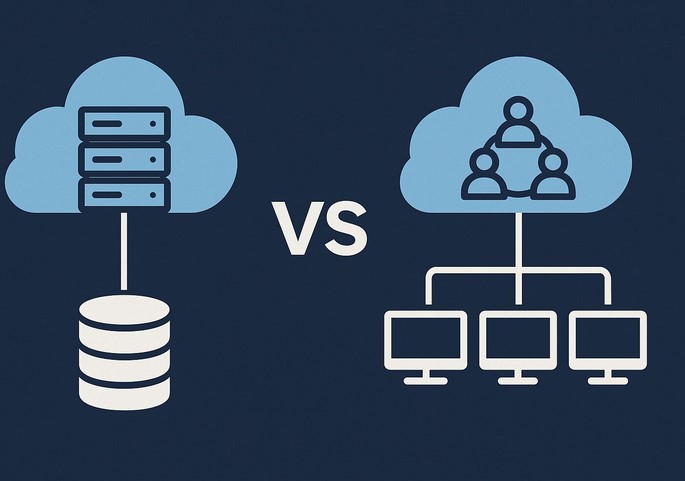
Public Cloud is like an Upscale Apartment Complex. You have your own unit (your data and apps), but you share the building’s plumbing, electricity, and lobby (the physical servers and network) with other tenants. It’s convenient, affordable, and the landlord (the provider) handles all the maintenance.
-
Private Cloud is like a Custom-Built Mansion. You own the land, the walls, and the pipes. No one else lives there. You have total control over security and design, but you’re responsible for the upkeep—and it definitely isn’t cheap.
In the tech world, this shared vs. dedicated environment is known as Multi-tenancy vs. Single-tenancy.
Deep-Diving into the Public Cloud: Speed and Agility
When we talk about the Public Cloud, we’re talking about the “Big Three”: AWS, Microsoft Azure, and Google Cloud. In 2026, these platforms have become so sophisticated that they can deploy global infrastructure in seconds.
Why Businesses Love Public Cloud
-
Elasticity: This is the “killer app” of the public model. If your app goes viral tomorrow, you can scale from 100 users to 1 million without buying a single piece of hardware.
-
Pay-as-you-go: You only pay for the Compute Power and Cloud Storage you actually use.
-
Innovation at Scale: You get instant access to cutting-edge tools like Machine Learning (ML) and Serverless Computing that would be impossible to build on your own.
The Trade-off
The biggest risk here isn’t necessarily security—public cloud providers spend billions on it—it’s Variable Costs. I’ve seen companies face “Bill Shock” because they left an unoptimized database running over the weekend, racking up thousands in unnecessary fees.
The Power of the Private Cloud: Control and Compliance
In my HealthTech experience, the Private Cloud is often the go-to for hospitals or fintech firms. When you are dealing with HIPAA or GDPR regulations, knowing exactly where your data “lives” physically is a massive advantage.
Why the Private Cloud Wins in 2026
-
Ironclad Privacy: Because the hardware isn’t shared (Single-tenant), the risk of “noisy neighbor” syndrome—where another company’s high traffic slows down your site—is zero.
-
Legacy Integration: Many older medical systems simply won’t run on the public cloud. A private setup allows you to bridge the gap between 20-year-old software and modern web apps.
-
Predictable Performance: You have a dedicated Bandwidth and Low Latency environment tailored specifically to your workloads.
The Trade-off
The Total Cost of Ownership (TCO) is high. You need a dedicated IT team to manage the Virtualization layer and the physical hardware. It’s a capital-heavy investment (CapEx) rather than an operational one (OpEx).
Technical Foundations: The Jargon You Need to Know
To navigate the private vs public cloud debate like a pro, you need to understand these LSI (Latent Semantic Indexing) terms:
-
Hypervisor: The software that creates and runs virtual machines (VMs). It’s the “brain” that allows one physical server to act like fifty digital ones.
-
Shared Responsibility Model: In the public cloud, the provider secures the cloud, but you are responsible for securing your data within the cloud. Many breaches happen because users forget this distinction.
-
Data Sovereignty: The legal requirement that data must be stored within the borders of a specific country. Private clouds make this much easier to manage.
-
Orchestration: The automated management of complex cloud tasks, often handled by tools like Kubernetes.
The Middle Ground: Hybrid and Multi-Cloud Strategies
Most people think it’s a binary choice: one or the other. But my most successful projects usually involve a Hybrid Cloud model.
Imagine a HealthTech app that stores sensitive patient records in a Private Cloud (for maximum security) but uses the Public Cloud to run its heavy AI-driven analytics. This gives you the “security of the mansion” with the “scalability of the apartment.”
Tips Pro: If you are a startup, start with Public Cloud to find your “Product-Market Fit” without heavy upfront costs. Only consider moving to Private or Hybrid when your compliance requirements or data egress fees (the cost of moving data out of the cloud) start to hurt your margins.
The “Egress Fee” Trap
One thing the big providers don’t advertise in their glossy brochures is the Egress Fee. It’s often free to put data into the public cloud, but it can be incredibly expensive to take it out.
I have seen companies essentially become “hostages” to a public cloud provider because the cost to migrate their 500 Terabytes of data to a different provider was more than their annual profit. Always have an Exit Strategy or a multi-cloud backup plan.
Comparison Table: At a Glance
| Feature | Public Cloud | Private Cloud |
| Setup Speed | Minutes | Weeks/Months |
| Scalability | Near-Infinite | Limited by Hardware |
| Security | Shared / Managed | Dedicated / Controlled |
| Cost Model | Monthly (OpEx) | High Upfront (CapEx) |
| Best For | Startups, Dev Labs, E-commerce | Healthcare, Government, Large Banks |
Summary: Which One Fits Your Business?
Choosing between private vs public cloud isn’t about finding the “best” technology; it’s about finding the best fit for your specific risk tolerance and budget.
-
Choose Public Cloud if you value speed, innovation, and have unpredictable traffic.
-
Choose Private Cloud if you handle highly regulated data and need absolute control over your hardware environment.
-
Choose Hybrid if you want the best of both worlds and have the technical staff to manage the complexity.
As we move deeper into 2026, the cloud is no longer just a “place” to store files—it is the engine of your business. Treat it with the respect it deserves.
Is your business currently struggling with high cloud bills or compliance anxiety? Are you considering a move from public to private (or vice versa)? Let’s discuss your specific use case in the comments below!