
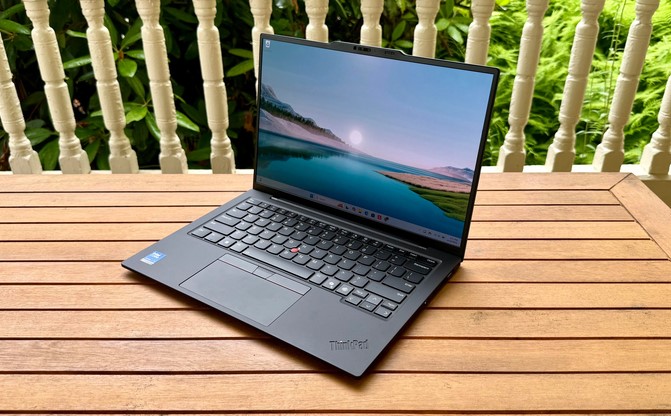
 I still remember standing in the security line at Chicago O’Hare back in 2018, desperately scanning the terminal for a wall outlet while my 4.5-pound workstation laptop sat dead in my bag. My back was aching, the heavy brick charger was tangled around my wrist, and I had a remote healthcare systems deployment meeting starting in fifteen minutes.
Fast forward to my mobile setup today in 2026: I routinely run real-time telemetry analytics, host multi-party video calls with local AI background noise isolation, and draft strategy reports on a sub-2.5-pound machine—all while leaving the wall charger packed at the bottom of my luggage for three days straight.
Having spent over a decade testing enterprise hardware and optimizing mobile tech deployments across health systems, I can confidently tell you that lightweight business laptops in 2026 have crossed a historic threshold. The days of sacrificing processing power or battery longevity to achieve a featherlight form factor are officially over.
If you are a hybrid professional, consultant, or executive trying to navigate the current laptop landscape, this deep-dive guide breaks down what makes 2026 machines different and how to choose the right gear for your daily workflow.
The 2026 Mobility Paradigm: Efficiency Over Brute Force
For years, buying an ultraportable laptop meant accepting severe compromises. You got a slim chassis, but under sustained workloads, the fans sounded like a jet engine, thermal throttling kicked in, and the battery drained in four hours.
The arrival of advanced, heterogeneous architecture—pairing power-efficient ARM-based chips (like Qualcomm’s Snapdragon X2 series) alongside cutting-edge x86 silicon (such as Intel’s Panther Lake and AMD’s Ryzen AI platforms)—has redefined mobile computing.
The Commuter Electric Car Analogy
Think of choosing modern lightweight business laptops like selecting a modern long-range electric vehicle:
-
Legacy Ultraportables: An early hybrid car with a tiny gas tank. It got you around town, but the moment you pushed it up a steep mountain highway (heavy multitasking), it strained, overheated, and ran out of juice.
-
2026 Ultraportables: A high-efficiency EV with a massive battery array and regenerative braking. You accelerate effortlessly up steep grades while barely watching the range gauge move.
+-----------------------------------------------------------------------+
|                 LEGACY ULTRAPORTABLES VS. 2026 STANDARDS              |
+-------------------+-------------------+-------------------------------+
| Specification     | Legacy Ultraportable | 2026 Lightweight Business Laptop |
+-------------------+-------------------+-------------------------------+
| Average Weight    | 3.0 to 3.8 lbs    | Under 2.6 lbs (Sub-1 kg options)|
+-------------------+-------------------+-------------------------------+
| Real-World Battery| 6 to 9 Hours      | 16 to 24+ Hours               |
+-------------------+-------------------+-------------------------------+
| AI Processing     | Cloud-dependent   | On-device NPU (45 to 80+ TOPS)|
+-------------------+-------------------+-------------------------------+
| Wireless Standard | Wi-Fi 6 / 6E      | Native Wi-Fi 7 Integration    |
+-------------------+-------------------+-------------------------------+
| Thermal Profile   | Aggressive Fan Noise| Silent / Low-Decibel Fan Curve|
+-------------------+-------------------+-------------------------------+
Architectural Breakthroughs Defining 2026 Business Laptops
To make an informed purchase, you need to understand the key hardware developments powering current lightweight business laptops.
1. High-Performance NPUs (Neural Processing Units)
In 2026, Copilot+ PC standards require integrated Neural Processing Units capable of delivering high TOPS (Trillions of Operations Per Second) for local AI tasks.
-
Local Data Privacy: Healthcare workers, legal professionals, and financial analysts can summarize sensitive clinical notes or contract documents locally without sending raw data to the public cloud.
-
Offloaded CPU Overhead: Real-time eye contact correction, acoustic noise cancellation, and automated live transcription run continuously on the NPU, leaving main CPU cores completely free for heavy spreadsheets or code compilation.
2. Native Wi-Fi 7 and Modular Connectivity
In ultra-dense environments—like airport terminals, medical wards, or bustling co-working spaces—older Wi-Fi standards struggle with channel congestion. Modern enterprise laptops incorporate Wi-Fi 7 controllers with Multi-Link Operation (MLO), ensuring multi-gigabit throughput and sub-millisecond latency even on crowded networks.
3. Advanced Display Engineering (Tandem OLED & Low-Power IPS)
Displays have traditionally been a laptop’s single largest power drain. 2026 laptops feature highly efficient tandem OLED and dynamic 120Hz refresh rate panels that drop down to a frugal 1Hz during static document reading, preserving battery life without sacrificing visual sharpness.
Top Hardware Architectures in 2026: Which One Fits Your Work?
Choosing among lightweight business laptops today comes down to understanding the chip architecture beneath the hood:
ARM-Based Architecture (Qualcomm Snapdragon X2 Series)
-
Best for: Mobile executives, remote consultants, and road warriors who prioritize extreme multi-day battery life and fanless or whisper-quiet thermal performance.
-
Strengths: Industry-leading battery efficiency (often exceeding 18–20 hours of continuous active web productivity) and fast wake times.
x86-Based Architecture (Intel Panther Lake / AMD Ryzen AI)
-
Best for: Developers, financial modeling experts, enterprise IT managers, and professionals bound to legacy x86 enterprise software or specialized peripheral drivers.
-
Strengths: Flawless compatibility with every legacy Windows enterprise stack, coupled with high multi-threaded performance and integrated graphics.
Field-Tested Advice: Pro Tips and Hidden Gotchas
Over my decade advising enterprise teams on mobile technology rollouts, I have seen buyers make expensive purchasing mistakes by focusing solely on specs on a box. Here are my battle-tested recommendations:
💡 Pro Tip: Prioritize Unified RAM Configurations
Local AI processing relies heavily on fast system memory shared across the CPU, GPU, and NPU. Skip base 8GB or 12GB models entirely. In 2026, 32GB of high-speed soldered LPDDR5X memory is the sweet spot for keeping multiple browser instances, local LLM agents, and heavy productivity suites running smoothly.
⚠️ Hidden Warning: Dongle Life and Port Selection
In the pursuit of sub-13mm thinness, several manufacturers have stripped built-in USB-A ports, HDMI outputs, and physical Smart Card readers. If you regularly present in client conference rooms or plug into legacy hospital and office docks, choose a chassis that preserves at least one native HDMI 2.1 port or dual Thunderbolt 4 / USB4 ports to avoid dongle headaches.
How to Choose Your Next Mobile Workstation
When selecting among current lightweight business laptops, align your purchase with your primary daily friction points:
-
Choose Maximum Portability (< 2.2 lbs / 1 kg): If your week involves walking miles through trade show floors, running between hospital wards, or taking multiple flights weekly.
-
Choose Balance & Screen Space (14-inch OLED / 2.5 lbs): The ideal middle ground for hybrid workers who split time between a home office desk and co-working environments, requiring ample screen real estate for side-by-side document review.
The mobile workplace has evolved. You no longer need to haul a heavy backpack or live in fear of the low-battery warning icon. Modern ultraportables deliver true desktop-class productivity wherever work happens to take you.
What Is Your Mobile Setup?
What is the most important factor when you pick a business laptop: all-day battery life, ultra-light weight, or raw performance?
Share your current road-warrior setups or hardware questions in the comments below! Let’s discuss how to pick the right mobile machine for your daily workload.