Gadgets

Wireless Charging Stations: The Next Step in Mobile Convenience

Source:https://www.vegerpower.com

In an increasingly digital world where smartphones, tablets, and wearables have become essential tools for both personal and professional life, the need for convenient charging solutions has never been more pressing. Wireless charging stations have emerged as a game-changing innovation, offering a frictionless way to power up devices without the hassle of tangled cords and plugs. With the rise of wireless charging technology, the way we interact with our devices is set to become even more efficient, providing a seamless charging experience that blends into the modern, fast-paced lifestyle. This article will explore the benefits of wireless charging stations, their potential to change how we think about charging, and what the future holds for this technology.

Understanding Wireless Charging Technology

Wireless charging, also known as inductive charging, uses electromagnetic fields to transfer energy between two objects, typically a charging pad and a device. The process involves an electromagnetic coil embedded in both the charging station and the device. When the device is placed on the charging pad, the two coils create an electromagnetic field that allows power to be transferred wirelessly. This technology eliminates the need for a physical connection between the device and the charger, making it far more convenient than traditional plug-in methods.

The development of wireless charging stations has been a game-changer, particularly for mobile devices, as it removes the physical limitations of cables and connectors. Over the past decade, wireless charging has evolved from a niche, experimental technology to a mainstream solution, with major tech companies like Apple, Samsung, and Google integrating wireless charging into their devices. Now, wireless charging stations are not only available in homes and offices but are also making their way into public spaces like airports, cafes, and even cars, offering unparalleled convenience for device owners.

Benefits of Wireless Charging Stations

1. Convenience and Simplicity

One of the most obvious advantages of wireless charging stations is their unparalleled convenience. Gone are the days of fumbling with tangled cords or searching for an available outlet. With wireless charging, users can simply place their device on the charging pad, and the charging process begins automatically. This hands-free approach means no more plugging and unplugging cables, which can be especially beneficial in public spaces like airports or offices where users are often in a hurry.

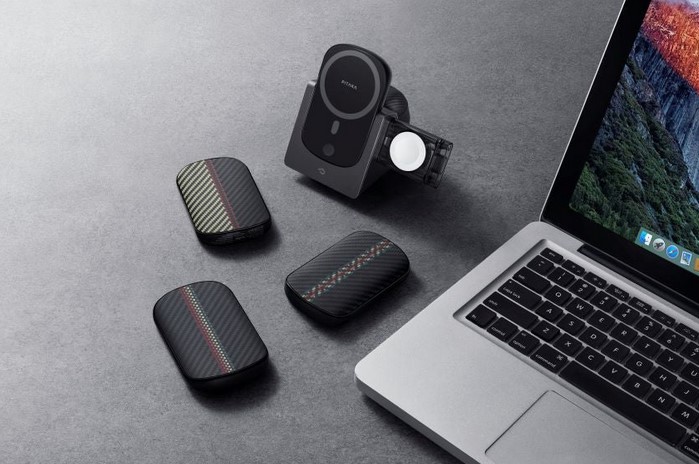
Furthermore, many wireless charging stations offer the ability to charge multiple devices simultaneously. For example, some models can charge smartphones, tablets, smartwatches, and wireless earbuds all at once, making them an ideal solution for those who use multiple devices throughout the day. This multi-device support adds a level of flexibility that traditional wired chargers simply cannot match.

2. Reduced Wear and Tear on Ports

Frequent plugging and unplugging of charging cables can cause wear and tear on both the charging port and the cable itself. Over time, this can lead to loose connections, which may result in inconsistent charging or even device damage. Wireless charging stations eliminate this problem entirely, as there is no physical connection required. This not only helps preserve the longevity of your device’s charging port but also reduces the number of cables you need to replace over time, which is both cost-effective and environmentally friendly.

3. Sleek and Minimalistic Design

Wireless charging stations are often designed with aesthetics in mind, offering a sleek and modern look that complements contemporary living spaces, offices, and even vehicles. Unlike traditional charging setups, which can be cluttered with cords, wireless charging stations offer a clean, minimalist approach. Whether you are using a charging pad on your desk or a wireless charger integrated into your car, these stations seamlessly blend into the environment, providing a more aesthetically pleasing and organized charging solution.

Many wireless charging stations are also compact and portable, making them easy to carry around. This is ideal for professionals who need to keep their devices charged while traveling or for anyone looking for a more streamlined, clutter-free charging experience at home.

4. Future-Proof Technology

As mobile devices continue to evolve, wireless charging stations are positioned to remain relevant, with future advancements in technology offering even more efficient and faster charging solutions. The latest wireless charging standards, such as Qi wireless charging, support faster charging speeds than ever before, meaning users can enjoy quick and efficient power-ups without being tethered to a wall outlet.

Moreover, as more devices, from smartphones to wearables to home appliances, begin to integrate wireless charging capabilities, wireless charging stations will become increasingly important in the future. The shift toward more universal standards for wireless charging means that soon, nearly all of your devices will be able to charge on the same pad, reducing the need for multiple different chargers.

Key Considerations for Choosing a Wireless Charging Station

1. Charging Speed

When choosing a wireless charging station, it’s essential to consider the charging speed. Some wireless chargers offer fast charging capabilities, allowing users to power up their devices more quickly. However, the charging speed may vary depending on factors such as the device being charged, the power output of the charging station, and the type of wireless charging standard being used.

For instance, modern smartphones that support fast wireless charging can take advantage of higher wattage chargers for quicker power-ups. However, it’s important to note that not all devices are compatible with fast wireless charging, so it’s crucial to check whether your device supports it before making a purchase.

2. Compatibility

While wireless charging stations are increasingly standard across devices, it’s still important to ensure that your device is compatible with the charging pad. Most modern devices support the Qi wireless charging standard, but it’s always a good idea to check the specifications to make sure your device will charge efficiently on the station. Some charging pads also support multiple devices, so if you have a smartphone, smartwatch, and wireless earbuds, make sure the station is designed to handle all of these simultaneously.

3. Design and Aesthetics

Design is another critical factor when selecting a wireless charging station. Whether you plan to place the charging pad on your desk, nightstand, or car dashboard, you’ll want a station that fits seamlessly into your space. Many wireless charging stations come in various shapes and materials, such as wood, leather, or metal, which allow you to choose one that complements your decor.

Some wireless charging stations are even integrated into furniture pieces, such as desks, tables, and nightstands, offering a discreet and convenient charging solution that eliminates the need for an external charging pad.

4. Price

While the technology behind wireless charging stations is continually improving, the prices of these devices can vary widely depending on the features, design, and brand. Budget options typically offer basic functionality, while high-end models may include advanced features such as fast charging, multi-device charging, and enhanced durability. As with any tech purchase, it’s essential to weigh the features and the price to ensure you’re getting the best value for your needs.

As mobile devices continue to integrate more advanced features, the need for efficient, convenient charging solutions will only increase. Wireless charging stations offer an innovative, simple, and elegant way to power devices without the limitations of traditional charging cables. With benefits such as enhanced convenience, reduced wear and tear on ports, and sleek design, wireless charging stations are fast becoming an essential part of modern living. Looking ahead, as wireless charging technology evolves and more devices adopt this feature, we can expect wireless charging stations to become even more ubiquitous and integral to our daily lives. Whether at home, in the office, or on the go, these stations are undoubtedly the next step in mobile convenience.

Gadgets

Shark Vacuum Not Sucking: Troubleshooting Your Cleaning Companion

Source : https://www.digitaltrends.com

When your Shark vacuum is working properly, it’s a powerful cleaning companion that helps keep your home spotless. However, it can be frustrating when you find that your Shark vacuum not sucking as it should. Whether it’s failing to pick up dirt, leaving debris behind, or emitting strange sounds, there are a variety of reasons why your vacuum may not be performing at its best. In this article, we will walk through common issues that can cause your Shark vacuum to lose suction and provide simple troubleshooting steps to get it back in working order. By following these tips, you’ll save time, money, and frustration by addressing the issue before considering costly repairs or replacements.

Understanding Why Your Shark Vacuum Might Not Be Sucking

Before diving into troubleshooting, it’s essential to understand why a vacuum may lose suction. Suction power in Shark vacuums, like in any vacuum cleaner, relies on a combination of components working together. The motor generates the suction, which then flows through a series of filters, hoses, and the vacuum nozzle to pull in debris and dirt. When one or more of these components is obstructed or malfunctioning, suction can decrease or stop altogether.

Common reasons for a Shark vacuum not sucking include clogged filters, a blocked hose, a full dustbin, or issues with the vacuum’s brush roll. Understanding these common culprits will allow you to identify the problem quickly and effectively.

1. Check the Dustbin and Filters

One of the most frequent causes of decreased suction is a full dustbin or clogged filters. The dustbin in your Shark vacuum is designed to collect debris and dust, but if it becomes too full, the airflow is restricted, and suction power is compromised.

How to Check:

  • First, empty the dustbin. Even if it looks half-full, dirt can accumulate in areas that are not immediately visible, blocking airflow.
  • Inspect the filters, especially if your vacuum model has a washable filter. These filters can become clogged with dust and dirt over time, restricting airflow and causing poor suction.

Solution:

  • Wash the filters according to the manufacturer’s instructions and let them dry completely before reinserting them into the vacuum. Clean the dustbin regularly to ensure the vacuum operates efficiently.

2. Inspect for Clogs in the Hose

Another common reason for your Shark vacuum not sucking properly is a blockage in the hose. A blocked hose prevents dirt from flowing into the dustbin, which can significantly reduce suction power. Clogs can occur when small items, such as socks or small toys, get sucked into the hose and obstruct airflow.

How to Check:

  • Disconnect the hose from both ends and visually inspect it for any visible blockages.
  • If there’s a clog, you may be able to push it out with a long, thin object, such as a broomstick or a vacuum hose cleaning tool.

Solution:

  • If the blockage is severe, use a vacuum hose cleaning tool or compressed air to dislodge the obstruction. If the clog persists, you may need to replace the hose entirely.

3. Examine the Brush Roll

The brush roll (or beater bar) is a critical component of your Shark vacuum that helps agitate dirt and debris from carpet fibers. If the brush roll becomes tangled with hair, string, or other debris, it may stop spinning correctly, reducing suction power. Additionally, if the brush roll is damaged or malfunctioning, it can also affect the vacuum’s ability to pick up dirt.

How to Check:

  • Turn off the vacuum and carefully inspect the brush roll for any debris that may be tangled around it.
  • Look for any visible damage to the brush roll, such as broken bristles or a worn-out belt.

Solution:

  • If the brush roll is clogged, remove the debris by hand or use scissors to cut any hair or string that is wrapped around it.
  • If the brush roll is damaged, you may need to replace it. Fortunately, most Shark vacuum models allow you to easily replace the brush roll at home.

4. Check for Issues with the Vacuum’s Motor or Seals

While the dustbin, hose, and brush roll are the most common culprits, there are other potential causes of a Shark vacuum not sucking. Sometimes, the motor that generates suction may be malfunctioning, or the seals around the dustbin, hose, or brush roll may be damaged.

How to Check:

  • Listen carefully when the vacuum is running. If the motor sounds weaker than usual, it may indicate a mechanical issue.
  • Check the seals and gaskets for any visible wear and tear or damage.

Solution:

  • If the motor is malfunctioning, contact Shark customer support or take the vacuum to a service center for repair.
  • If the seals are damaged, replace them with the appropriate parts for your vacuum model. Seals are crucial for maintaining suction, so don’t ignore any visible cracks or damage.

5. Ensure the Vacuum Settings Are Correct

Some Shark vacuum models come with adjustable height settings for different floor types. If the vacuum’s height is set too high for your carpet or floor type, it may cause a decrease in suction efficiency. Additionally, some vacuums have suction settings that can be adjusted for different surfaces.

How to Check:

  • Adjust the height setting of the vacuum to match the type of flooring you are cleaning. For carpeted floors, set the height lower, and for hard floors, set it higher.
  • Ensure that the suction setting is appropriate for the surface you are cleaning.

Solution:

  • Experiment with different height and suction settings to see if it improves suction. Make sure that your vacuum is set to the optimal configuration for your floor type.

In conclusion, a Shark vacuum not sucking can be a frustrating problem, but with the right troubleshooting steps, you can usually get your vacuum back to optimal performance. Regular maintenance, such as emptying the dustbin, cleaning the filters, and inspecting the brush roll and hoses for clogs, will keep your Shark vacuum functioning efficiently. Don’t forget to check for any issues with the motor, seals, or vacuum settings, which can also contribute to a decrease in suction power. If the issue persists despite your troubleshooting efforts, don’t hesitate to contact Shark customer support for further assistance. With a little care and attention, your Shark vacuum will continue to be a reliable cleaning companion for years to come.

Gadgets

Ring vs. Arlo: Choosing the Right Security Camera System

Source : https://www.security.org

When it comes to home security, the need for reliable, user-friendly, and high-quality security camera systems has never been greater. As technology continues to evolve, two of the most popular names in the industry have emerged: Ring v Arlo. Both brands offer comprehensive security solutions with unique features, making the decision between the two systems a critical one for homeowners. In this article, we will compare the two, exploring their key features, performance, pricing, and ease of use to help you choose the right system for your needs.

Overview of Ring and Arlo

Before diving into the specifics, it’s important to understand what each of these brands brings to the table. Ring, acquired by Amazon, is primarily known for its video doorbells but has since expanded its product line to include security cameras and other smart home devices. Ring’s cameras and doorbells offer a highly integrated system that works well with other smart home devices, particularly those that use Amazon’s Alexa.

Arlo, on the other hand, is a more dedicated security camera brand with a focus on high-quality video surveillance and advanced smart features. Known for its cutting-edge wireless technology, Arlo cameras are designed to be installed anywhere in and around your home, offering flexibility and versatility. While Arlo does offer a doorbell, it has built a strong reputation for its camera systems.

Both systems have their strengths and weaknesses, so understanding how Ring v Arlo stacks up against each other will help determine which is best suited to your home’s needs.

Key Features: Comparing Ring and Arlo

The main difference between Ring and Arlo comes down to the variety of features they offer. Let’s take a closer look at what each system provides.

Ring Features

  1. Integrated Smart Home Ecosystem: Ring’s integration with Amazon Alexa is one of its strongest selling points. You can control Ring cameras, doorbells, and other smart devices via voice commands and automation. This seamless experience makes Ring a great choice for those who already use Amazon devices.
  2. Video Doorbells: Ring is best known for its video doorbells, which allow users to see who is at their door and interact with visitors remotely via two-way audio. This feature has revolutionized home security by making it easy to monitor visitors from anywhere.
  3. Affordable Plans: Ring offers competitive pricing, especially for basic video recording. Its subscription service, Ring Protect, is affordable and provides cloud storage, video sharing, and more. Ring also has a free plan that allows live streaming and two-way communication.
  4. Night Vision and Motion Detection: Ring cameras are equipped with infrared night vision and motion detection, which can send alerts to your phone when activity is detected.
  5. Customizable Alerts: With Ring, you can adjust your alert settings to avoid receiving too many notifications while still ensuring that you’re notified when something important happens.

Arlo Features

  1. 4K Video Resolution: One of Arlo’s standout features is its 4K video quality, which is superior to most home security cameras. For users who want crystal-clear video footage, this is a major advantage.
  2. Wire-Free Design: Arlo cameras are wireless, which gives users more flexibility when it comes to installation. You can place Arlo cameras wherever you need them, without worrying about power outlets.
  3. Advanced Motion Detection: Arlo offers advanced motion detection with AI-powered features like person detection, which helps reduce false alerts by distinguishing between people, animals, and other motion.
  4. Weatherproofing: Arlo cameras are known for their durability and weather-resistant design. Whether you’re placing them indoors or outdoors, Arlo cameras are built to withstand all conditions.
  5. Smart Home Integration: Arlo works well with both Amazon Alexa and Google Assistant, providing options for voice control and integration with other smart home devices.

Performance and Ease of Use: Ring vs. Arlo

When it comes to performance and ease of use, both Ring and Arlo offer intuitive setups and reliable apps that allow you to view live footage and manage your system from your smartphone. However, there are some differences in how they perform.

Ring Performance

Ring cameras are generally very reliable and provide decent video quality. While they may not offer the same high-definition resolution as Arlo, they do offer solid performance with features like night vision and live streaming. Ring’s app is easy to use, allowing you to access your camera feeds quickly and efficiently. However, the camera’s motion detection feature can sometimes be a little too sensitive, leading to false alarms, especially for outdoor cameras.

Arlo Performance

Arlo’s performance is exceptional, especially when it comes to video quality. With options for 1080p and 4K video, Arlo stands out for providing more detailed images. The camera’s battery life can be longer than Ring’s, especially for outdoor models, due to its wireless design and optimized power consumption. However, Arlo can be more challenging to set up, particularly for users who are not as familiar with smart home devices.

Pricing: Ring vs. Arlo

Price is always an important factor when choosing a security camera system, and both Ring v Arlo offer different pricing structures depending on the product and subscription plan.

Ring Pricing

Ring cameras are generally more affordable than Arlo cameras. The basic models start at a lower price point, with additional features such as video recording and cloud storage available through a subscription plan (Ring Protect). The Ring Protect plan is quite affordable, starting at $3 per month per device, and includes video storage for up to 60 days.

Arlo Pricing

Arlo cameras tend to be more expensive upfront, particularly for models that offer 4K resolution. However, the performance and features you get with Arlo cameras justify the price for many users. Arlo’s subscription plans, Arlo Smart, start at $2.99 per month, but additional features such as enhanced video quality and more storage space come at higher price points.

Choosing the right security camera system depends on your priorities, whether it’s affordability, video quality, ease of use, or integration with your existing smart home devices. Ring v Arlo both offer solid options for home security, but they cater to slightly different needs.

If you’re looking for a more budget-friendly option that integrates seamlessly with Alexa and offers a variety of cameras and video doorbells, Ring may be the right choice for you. On the other hand, if you prioritize high-resolution video, advanced motion detection, and the flexibility of wireless installation, Arlo might be more suitable for your home security needs.

Ultimately, both brands have proven themselves to be reliable options, so it all comes down to which features matter most to you. With either system, you can rest assured that your home is in good hands.

Gadgets

Best Mic for Phone: Enhancing Mobile Audio Quality

Source : https://mysterio.yahoo.com

In today’s fast-paced world, smartphones have become essential tools for communication, entertainment, and content creation. Whether it’s recording a podcast, capturing a video, or making an important phone call, the quality of audio plays a critical role in ensuring clear communication. Many users are now seeking the best mic for phone to enhance their audio experience and capture professional-grade sound. In this article, we will explore the factors to consider when choosing a microphone for your phone, highlight some of the top options available, and explain how the right mic can significantly improve mobile audio quality.

Factors to Consider When Choosing the Best Mic for Phone

When selecting a microphone for your phone, there are several key factors to consider that will impact your overall audio quality. The ideal mic should not only provide clear sound but also be compatible with your mobile device and meet your specific needs. Here are some important considerations when looking for the best mic for phone:

1. Compatibility

The first step in finding the right microphone is ensuring it is compatible with your phone. Most modern smartphones use a 3.5mm headphone jack, but newer models may require adapters or may only support USB-C or Lightning connectors. Additionally, some microphones are designed specifically for either Android or iOS devices, so you need to choose one that fits your phone’s port and connectivity options.

2. Audio Quality

The primary reason for purchasing an external mic is to improve the quality of audio. A high-quality microphone should capture sound with minimal distortion, noise, and interference. Look for microphones that offer clear, crisp audio, especially if you plan on using it for professional recordings, streaming, or content creation. Consider the frequency response and sensitivity of the mic to ensure it captures a wide range of sounds accurately.

3. Portability

Since many people use their smartphones for on-the-go activities such as interviews, vlogging, or streaming, portability is a crucial feature in a mic. Ideally, you want a microphone that is lightweight, compact, and easy to carry around. Look for models that come with carrying cases or protective pouches for easy storage.

4. Type of Microphone

There are different types of microphones available, and each has its advantages and use cases:

  • Lavalier Mics (Clip-on Mics): These small, clip-on mics are ideal for hands-free use, interviews, or recording voice in noisy environments. They are often used by content creators, public speakers, and vloggers.
  • Shotgun Mics: These are highly directional microphones designed to pick up sound from a specific source while rejecting noise from the sides and back. They are great for capturing focused audio in environments with a lot of background noise.
  • Condenser Mics: These mics are popular for high-quality recordings, as they capture rich, clear sound. They are commonly used for voiceover work, podcasts, and video production.
  • USB Microphones: Some USB microphones can be used with phones via a compatible adapter. These microphones are often used for podcasting or streaming because of their excellent sound quality.

5. Budget

Finally, your budget will play a role in determining which microphone is the best fit for you. There are excellent options in various price ranges, so it’s important to weigh the features against the cost. Higher-end microphones typically offer more durability, superior sound quality, and additional features, but there are also budget-friendly options that can deliver great performance for casual or occasional use.

Top Picks for the Best Mic for Phone

Now that we have discussed the important factors to consider, here are some of the best microphones for phones available today:

1. Shure MV88 Digital Stereo Condenser Microphone

The Shure MV88 is a compact and high-performance stereo microphone that is perfect for mobile content creators. It connects directly to iOS devices via a Lightning connector and provides exceptional audio quality. With a built-in DSP (digital signal processing), the MV88 offers adjustable settings for different recording environments, including voice, flat, and acoustic modes. Its small size and high-quality sound make it an ideal choice for on-the-go podcasters, musicians, and videographers.

2. Rode VideoMic Me-L

Rode’s VideoMic Me-L is a shotgun-style microphone designed specifically for iOS devices. It connects directly to the Lightning port, making it incredibly easy to use without the need for any adapters. The VideoMic Me-L offers highly directional sound capture, which is perfect for reducing background noise while recording in busy or noisy environments. It also features a built-in headphone jack for real-time audio monitoring, giving users full control over their recordings.

3. Boya BY-M1 Lavalier Microphone

If you’re looking for an affordable, versatile, and high-quality microphone for your phone, the Boya BY-M1 is a great option. This lavalier mic is compatible with both Android and iOS devices and connects via the 3.5mm headphone jack. It delivers clear audio and comes with a long cable, making it suitable for interviews, video shoots, and vlogging. For those on a budget who want excellent audio quality, the Boya BY-M1 is a top contender for the best mic for phone.

4. Sennheiser ClipMic Digital

The Sennheiser ClipMic Digital is a premium lavalier microphone that provides studio-grade audio for mobile devices. It connects via the Lightning port for iOS devices, ensuring fast and reliable connections. The mic features an A/D converter for superior sound quality and offers an impressive frequency response. It’s particularly suited for those who require high-fidelity audio for professional podcasts, video production, or voiceover work.

5. Movo VXR10 Universal Video Microphone

The Movo VXR10 is a compact and affordable shotgun microphone that works with both iOS and Android devices. It features a cardioid polar pattern, which helps isolate sound from the front while rejecting noise from the sides and rear. The microphone is lightweight and comes with a shock mount and a furry windscreen, making it an excellent choice for outdoor use, interviews, and vlogging.

Choosing the best mic for phone ultimately depends on your specific needs, whether you’re a content creator, podcaster, or simply looking to improve the audio quality of your phone calls. Factors such as compatibility, portability, and audio quality should guide your decision. With the right microphone, you can significantly enhance your mobile audio experience, ensuring clear and professional sound for any application. From lavalier mics to shotgun microphones, the options available today can meet a variety of needs and budgets, allowing users to take their mobile audio to the next level.

Gadgets

Switch Bikes: Exploring the World of Electric Bicycles

Source : https://gocycle.com

The advent of electric bicycles has brought a new era to the world of cycling, blending technology with sustainability to create an entirely new riding experience. Among the leading trends in this innovative space are switch bikes, which provide an exciting alternative to traditional bicycles by allowing riders to switch between manual pedaling and electric-powered assistance with ease. As cities around the world seek more eco-friendly transportation solutions, electric bikes have become a popular choice for commuters, fitness enthusiasts, and adventure seekers alike. This article delves into the world of switch bikes, exploring their benefits, features, and why they are transforming urban mobility.

What Are Switch Bikes?

Switch bikes, or electric bicycles, are traditional bicycles equipped with an electric motor that can assist the rider with pedaling. Unlike conventional bikes, which require all of the rider’s energy to propel them forward, switch bikes come with an integrated motor that can be activated for additional power. This motor is powered by a rechargeable battery, which provides assistance when the rider needs it, whether for tackling steep hills, navigating through heavy traffic, or just enjoying a smooth, relaxed ride.

One of the defining features of switch bikes is the ability to toggle between modes. Riders can choose to pedal manually, rely on the electric motor, or use a combination of both for a customized experience. This flexibility makes electric bicycles accessible to a wide range of users, from those seeking a low-impact workout to those who want to minimize effort during longer commutes.

Key Benefits of Switch Bikes

Electric bikes, including switch bikes, come with a wide array of benefits that appeal to different kinds of riders. These benefits include environmental advantages, health perks, and practical advantages for everyday use. Here are some of the most significant benefits of using a switch bike:

1. Eco-Friendly Transportation

In an age where reducing carbon footprints is more important than ever, switch bikes offer a green alternative to cars and other gas-powered vehicles. By choosing an electric bike over a traditional car for short trips, commuters can drastically reduce their carbon emissions. With zero emissions during operation, switch bikes are an ideal choice for anyone looking to contribute to cleaner air and less congestion in urban environments.

The ability to charge a switch bike using renewable energy sources, such as solar power, only amplifies the environmental benefits, making electric bikes an integral part of the broader shift toward sustainable transportation.

2. Cost-Effective Commuting

Switch bikes can also be a more affordable transportation option compared to owning a car. While the initial investment in an electric bike may be higher than a traditional bike, the long-term savings on fuel, parking, and maintenance costs make it a worthwhile choice. Moreover, many cities are implementing bike lanes and bike-sharing programs, further encouraging the use of electric bicycles for daily commutes.

Switch bikes can also be used to bypass congested traffic, reducing commute times and improving overall efficiency. They are ideal for those living in urban areas where traffic jams and high fuel costs are everyday concerns.

3. Health and Fitness Benefits

While the motor of a switch bike provides assistance, riders still engage in physical activity, making it a great way to stay active. Riding an electric bike helps improve cardiovascular health, build muscle strength, and enhance overall fitness. However, the electric motor allows riders to adjust the level of difficulty, making it accessible to individuals who may not be able to handle the strain of a traditional bicycle.

For those who are recovering from an injury or have limited mobility, switch bikes can offer a less strenuous yet effective alternative to more traditional forms of exercise. Riders can gradually increase their physical effort as they become more accustomed to the bike, making it a fantastic tool for improving fitness at any level.

Choosing the Right Switch Bike

When selecting a switch bike, it’s important to consider several factors to ensure you get the right model for your needs. Key features to pay attention to include battery life, motor power, frame material, and overall bike design. Let’s take a closer look at these features:

1. Battery Life and Charging Time

Battery life is one of the most critical factors in determining the practicality of a switch bike. Depending on the model, electric bikes can offer anywhere from 20 to 100 miles of assistance per charge. Riders should consider their typical commuting distance and choose a bike with a battery that can cover their daily needs without requiring frequent recharges.

Charging time is another important consideration. Most electric bikes require between 4-8 hours for a full charge, but some models offer faster charging options. Riders who plan to use their bike for commuting will benefit from a model that allows for quick recharging during the workday or overnight.

2. Motor Power and Performance

The motor’s power is another key consideration when purchasing a switch bike. Motors typically range from 250W to 750W in power. Lower-powered motors are sufficient for flat terrain and light commuting, while more powerful motors are ideal for steep hills and longer rides. Riders should consider where they plan to use the bike and how much power they need to make their journey comfortable.

3. Comfort and Design

Comfort is an essential factor, especially for long rides. Look for a switch bike with an ergonomic design that provides a comfortable saddle, adjustable handlebars, and suspension features that reduce the impact of bumpy roads. The frame material (such as aluminum, carbon fiber, or steel) also plays a role in weight, durability, and comfort. Lighter bikes are easier to maneuver but may come at a higher price point, while heavier bikes tend to offer more stability.

As cities embrace sustainable transportation solutions, switch bikes are at the forefront of the movement, offering an eco-friendly, cost-effective, and healthy alternative to traditional vehicles. Whether for commuting, exercise, or leisure, electric bicycles are changing the way we think about getting from point A to point B. With a wide variety of models to suit different needs, switch bikes are becoming an increasingly popular choice for those looking to make a positive impact on the environment while enjoying the benefits of cycling. As technology continues to advance, the future of switch bikes looks bright, and their role in urban mobility will only continue to grow.