
Picture this: You’re in a bustling coffee shop, rushing to finish a medical tech proposal before your next flight. You get up for thirty seconds to grab a napkin, and in that window, someone glances at your screen. You’ve typed your password—”Password123!”—a dozen times today, and anyone watching your fingers could mimic the pattern in a heartbeat.
In my ten years navigating the sensitive corridors of HealthTech, I’ve seen data breaches that didn’t happen because of sophisticated hackers in dark rooms, but because of “shoulder surfing” in public spaces. That’s why, when people ask me for hardware recommendations, I don’t start with RAM or CPU. I start with the power button—specifically, laptops with fingerprint sensor technology.
If you are still typing a PIN or a password every time you wake your computer, you aren’t just wasting time; you’re leaving your digital front door unlocked.
The Evolution of the “Biological Key”
When I first started in the tech industry, biometric scanners on laptops were bulky, unreliable strips that required you to swipe your finger perfectly—usually taking three or four tries before letting you in. I remember a specific instance at a health conference where a colleague couldn’t access a critical patient data presentation because his hands were slightly damp, and the old-school sensor simply gave up.
Today, the landscape has changed. Modern laptops with fingerprint sensor tech utilize “match-on-chip” architecture. This means your fingerprint data never actually leaves the sensor’s dedicated hardware, making it exponentially harder for malware to intercept.
An Analogy You Can Understand
Think of a standard password like a physical key. If someone steals it or makes a copy, they have total access to your house. A fingerprint sensor, however, is like having a highly trained security guard who recognizes your face and voice. Even if someone finds your “key,” they can’t get past the guard because they aren’t you.
1. Why You Need Laptops with Fingerprint Sensor Technology
In a world where we manage banking, health records, and private work files on a single device, “convenience” is often the enemy of security. Biometrics bridge that gap.
-
Eliminating Password Fatigue: We are told to use complex, unique passwords for everything. Most people fail at this and reuse the same weak ones. A fingerprint sensor allows you to use a 20-character “impossible” password for your OS, knowing you’ll only ever have to touch a button to enter.
-
Instant Multi-Factor Authentication (MFA): Many modern apps and websites now support Windows Hello or Touch ID. This means your finger becomes the second layer of defense for your most sensitive accounts.
-
Speed in Critical Moments: In HealthTech, seconds save lives. Whether it’s an IT admin responding to a server crash or a doctor accessing a chart, skipping the login screen saves cumulative hours of productivity per year.
2. The Technical Core: Capacitive vs. Optical Sensors
Not all laptops with fingerprint sensor modules are created equal. If you’re looking to buy a new machine, you need to know what’s under the glass.
Capacitive Sensors (The Industry Standard)
Most high-end laptops use capacitive technology. These sensors use tiny electrical currents to map the ridges and valleys of your finger. Because they measure the physical “depth” of your print, they are incredibly hard to fool with a simple high-resolution photo.
Optical Sensors
These are essentially specialized cameras that take a 2D picture of your finger. While cheaper, they are less secure and struggle with dirty or wet fingers. In my professional opinion, if you are handling sensitive data, always opt for a laptop with a capacitive sensor.
3. Top Features to Look for in Modern Biometric Laptops
When scouting for your next upgrade, keep these LSI Keywords and technical specs in mind to ensure you’re getting more than just a gimmick.
-
Windows Hello Integration: For PC users, ensure the laptop is “Windows Hello Compatible.” This ensures a seamless handshake between the hardware and the operating system.
-
TPM 2.0 (Trusted Platform Module): This is the “vault” where your encrypted biometric data is stored. Without a TPM chip, a fingerprint sensor is significantly more vulnerable.
-
Self-Learning Algorithms: The best sensors actually “learn” your finger over time. If you have a small papercut or your skin is dry, the software adjusts the map to keep recognition rates high.
4. Addressing the Privacy Elephant in the Room
One of the most common questions I get is: “Is the government or the manufacturer stealing my fingerprint?”
As someone who has audited data privacy protocols, I can tell you that on reputable laptops with fingerprint sensor models (like those from Dell, HP, Apple, or Lenovo), your actual “image” of the fingerprint is never stored.
Instead, the system creates a mathematical hash—a complex string of numbers—that represents your print. Even if a hacker stole that hash, they couldn’t turn it back into a picture of your finger. It’s a one-way street.
5. Expert Advice: The “Hidden Warning”
While I am a huge advocate for biometrics, there is a reality check you need to hear.
Tips Pro: Always have a “Emergency Backdoor.” Fingerprint sensors can fail if the hardware is damaged or if you have a significant injury to your hand. Never rely solely on biometrics without knowing your master recovery password.
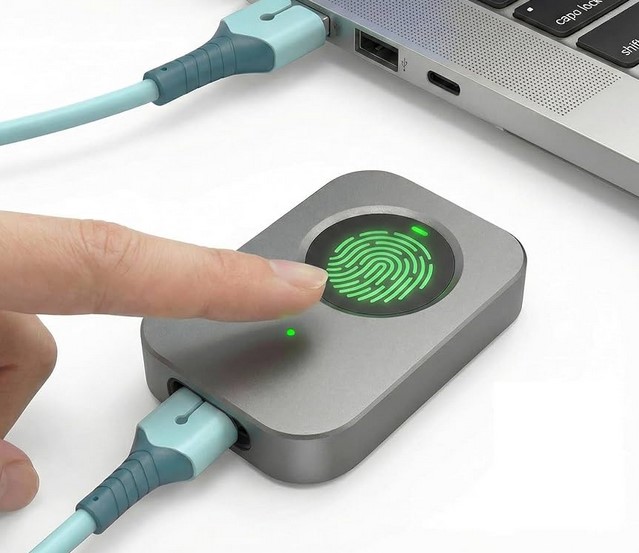
Peringatan Tersembunyi: Beware of cheap, third-party USB fingerprint dongles. Many of them store data insecurely or lack the encryption standards found in built-in sensors from major manufacturers.
6. Boosting Productivity: Beyond Just Logging In
The true power of laptops with fingerprint sensor tech isn’t just the lock screen. It’s the ecosystem.
-
Password Managers: Apps like 1Password or LastPass allow you to autofill complex credentials with a touch.
-
Sudo Access for Developers: If you spend time in the terminal (command line), you can often configure your system to accept a fingerprint scan instead of typing your admin password for every command.
-
Encrypted Folders: Some laptops allow you to “lock” specific folders that will only open with your biometric ID, adding an extra layer of protection for those sensitive medical or financial spreadsheets.
Summary: A Touch of Future-Proofing
In my decade-plus of experience, the most secure systems are the ones that are easiest to use. If security is a chore, people will find ways to bypass it. Laptops with fingerprint sensor technology turn the “chore” of security into a half-second habit.
Whether you are a freelancer working from a cafe or a HealthTech executive managing patient databases, your fingerprint is the most unique, un-guessable password you will ever own. It’s time to start using it.
Is your next laptop going biometric?
If you’ve been on the fence about whether that extra $50 for a fingerprint model is worth it, I hope this guide made the choice clear. What’s your biggest concern when it comes to biometric security—privacy or reliability? Let’s chat in the comments below!