Gadgets

Wireless Printers for Home and Office Use

Source:https://www.realsimple.com

In today’s increasingly connected world, wireless printers have become essential tools for both home and office environments. These devices offer the convenience of printing without being tethered to a single workspace, allowing multiple users to send print jobs from laptops, tablets, and smartphones with ease. Whether you’re managing school assignments, remote work tasks, or high-volume office printing, wireless printers provide flexibility, efficiency, and seamless integration with modern digital workflows. This article explores the key features, benefits, and best practices for choosing a wireless printer that meets your specific needs, helping you make a well-informed decision for your home or office setup.

As technology continues to evolve, so do the expectations for wireless printing solutions. Today’s market offers a wide range of options, from affordable all-in-one home models to robust, high-speed units designed for enterprise environments. In addition to performance and reliability, important considerations include connectivity options, security features, ease of use, and long-term operational costs. By understanding these factors, you can select a wireless printer that not only saves time and simplifies tasks but also enhances productivity and workflow across multiple devices and users.

Key Features to Consider When Choosing Wireless Printers

Selecting the right wireless printer involves more than just finding a model that connects to Wi-Fi. A thoughtful choice can significantly impact print quality, usability, and overall satisfaction. Below are important features and specifications to evaluate before investing in a wireless printer.

Print Quality and Speed

Print quality is often measured in dots per inch (DPI), which determines how sharp and detailed your printed documents and photos will appear. For general home use, such as printing text documents, a moderate DPI is typically sufficient. However, if you require high-resolution photos or graphic-intensive materials, look for wireless printers with higher DPI capabilities and advanced color management features.

Speed is another crucial factor, especially for office environments where large volumes of printing are common. Print speed is usually stated in pages per minute (PPM). Higher PPM values indicate faster output, which can boost productivity and reduce wait times during busy work periods.

Connectivity and Compatibility

One of the primary advantages of wireless printers is their ability to connect to multiple devices without direct physical connections. Most modern models support Wi-Fi connectivity, allowing devices on the same network to send print jobs easily. Some printers also offer Bluetooth and mobile printing technologies such as Apple AirPrint, Google Cloud Print, and Wi-Fi Direct, enabling direct printing from smartphones and tablets.

Compatibility with different operating systems is equally important. Ensure that the wireless printer you choose supports the devices you use regularly, whether they run Windows, macOS, iOS, Android, or Linux. This will prevent connectivity issues and ensure a smoother printing experience across all platforms.

All-in-One Functionality

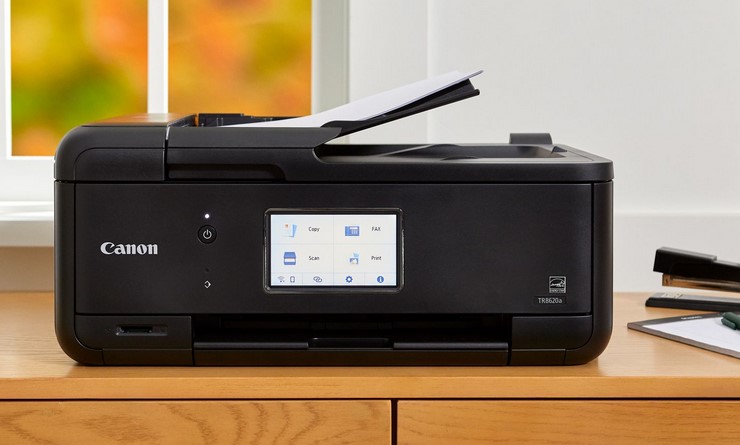
For both home and office settings, all-in-one wireless printers — which combine printing, scanning, copying, and sometimes faxing — offer versatility and cost savings. These multifunction devices reduce clutter and save space while consolidating essential tasks in one unit. They are particularly useful in small offices and home workspaces where separate devices for each task may not be practical.

Advanced all-in-one models also come with document feeders, automatic duplex printing (double-sided printing), and touchscreen interfaces, enhancing user convenience and automation.

Security and Network Protection

With printers connected to your wireless network, security becomes a key consideration. Look for models that support secure authentication protocols for Wi-Fi connections, such as WPA2 or WPA3, to prevent unauthorized access. Some enterprise-grade wireless printers also provide encryption for print jobs and user authentication systems that require a PIN or badge scan before printing, which is valuable in shared office environments.

Secure firmware updates and remote management features can also help maintain network integrity and protect sensitive documents from interception.

Practical Use Cases for Home and Office Settings

Wireless printers deliver distinct advantages depending on how and where they are used. Understanding common use cases can help you determine which features matter most for your situation.

Home Use: Convenience and Connectivity

At home, wireless printers are ideal for families, students, and remote workers who need flexibility and multi-device access. With support for printing from laptops, tablets, and phones, family members can send documents from anywhere in the house without physically connecting to the printer. Parents can print school forms, photos, and work-related materials, while children can easily print homework assignments or creative projects.

For home offices, an all-in-one wireless printer with scanning and copying functions can replace multiple devices, reducing clutter and streamlining tasks. Many models also offer user-friendly mobile apps that allow for remote printing, ink monitoring, and troubleshooting without needing to be near the device.

Office Use: Productivity and Collaboration

In office environments, wireless printers can improve workflow efficiency and collaboration among team members. Departments can share a centralized printer without the need for direct connections, making it easier to manage large volumes of print jobs and reduce hardware redundancy.

Enterprise-grade wireless printers often come with features tailored for business needs, such as heavy-duty paper handling, high-capacity trays, advanced security settings, and support for network printing protocols. These capabilities help ensure smooth operations even during peak usage periods. Additionally, cloud integration options allow teams to print documents directly from cloud storage services, boosting remote work productivity.

Maintenance and Cost Considerations

Owning a wireless printer brings ongoing responsibilities and costs. To ensure long-term performance and value, consider the total cost of ownership (TCO), which includes not just the purchase price but also the cost of ink or toner, maintenance, and potential repairs.

Inkjet vs. Laser: Inkjet printers are generally more affordable upfront and excel at printing high-quality photos and color documents. However, ink cartridges can be expensive and may need frequent replacement, especially with high usage. Laser printers, particularly monochrome models, have higher upfront costs but lower cost-per-page and are ideal for heavy text printing.

Routine maintenance — such as cleaning print heads, updating firmware, and replacing consumables — helps extend the life of your wireless printer. Some manufacturers offer subscription services for automatic ink or toner delivery, which can reduce downtime and simplify supply management.

As connectivity and digital workflows continue to evolve, wireless printers have become indispensable tools for both home and office environments. Their flexibility, ease of use, and advanced features make them valuable investments for anyone looking to streamline printing tasks, enhance productivity, and support multi-device workflows without the clutter of wired connections. When choosing a wireless printer, consider factors like print quality, speed, security, and long-term cost to find a model that best fits your unique needs and usage patterns. With the right choice, you can enjoy a seamless and efficient printing experience that complements your daily tasks and professional demands.
Laptops

Laptops with Best Keyboards for Typing Comfort

Source:https://i.rtings.com

When it comes to choosing a notebook for daily workflows, one of the most critical yet sometimes overlooked features is the keyboard quality. For writers, programmers, editors, and professionals who spend hours typing every day, selecting laptops with best keyboards can significantly impact productivity and comfort. A well-designed laptop keyboard not only supports faster and more accurate typing, but also reduces fatigue, enhances ergonomics, and improves overall user experience. In 2026, advancements in keyboard design, materials, and feedback mechanisms have elevated typing comfort to new heights.

In this article, we explore what makes certain laptop keyboards stand out, highlight the top contenders for the most comfortable typing experience, and provide actionable insights on choosing the right machine based on your unique needs. Whether you are drafting long-form documents, coding for hours, or simply prefer a satisfying typing feel, this guide will help you make a more informed purchase.

What Defines a Great Laptop Keyboard?

Before diving into specific models, it’s important to understand the key elements that contribute to an excellent laptop keyboard. Not all keyboards are created equal, and several technical and ergonomic aspects influence comfort, responsiveness, and efficiency.

Key Travel and Tactile Feedback

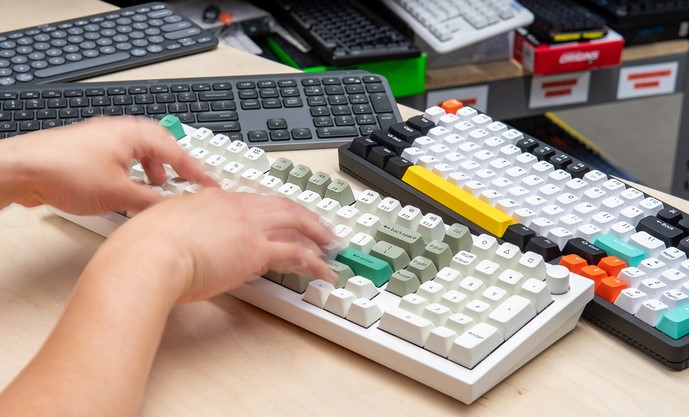
One of the most important aspects of a keyboard’s feel is key travel — the distance a key moves when pressed. Traditional desktop mechanical keyboards often have deeper travel, which many touch typists prefer for a satisfying, responsive feel. In contrast, ultra-thin laptops may offer shallower travel, leading to a different typing experience. The ideal balance is subjective, but most professionals prefer moderate travel (around 1.5mm to 2mm) combined with well-calibrated tactile feedback.

Tactile feedback refers to how a key responds as it’s pressed. A keyboard with good feedback gives a noticeable but not obstructive response, helping typists know exactly when a keypress has registered. This reduces the likelihood of typos and enhances typing speed over time.

Layout and Key Spacing

Equally important is the overall layout and spacing of keys. A comfortable keyboard should offer well-spaced keys that reduce the chances of accidental presses, especially for longer fingers. Larger laptops often have more room for properly spaced keys, while compact models sometimes require compromises. Additionally, the inclusion of full-sized arrow keys, a dedicated number pad, and intuitive function keys increases usability for many professionals.

Ergonomics and Wrist Support

Ergonomics also play a role, especially for those who type for extended sessions. A keyboard with a slight tilt, well-placed palm rest, and consistent key resistance helps maintain a neutral wrist position, reducing strain over time. Some manufacturers also introduce soft-touch coatings or layered keycaps designed to enhance grip and comfort.

Backlighting and Customization

Backlit keyboards have become a near-essential feature for many users. Adjustable lighting not only assists in low-light environments but also adds a level of personalization. Some advanced models offer per-key lighting customization, allowing users to create optimized layouts for typing, coding, or shortcuts.

Top Laptops for Typing Comfort in 2026

Now that we’ve covered the key characteristics of a good laptop keyboard, let’s explore some of the top laptops that deliver exceptional typing comfort. These models are selected based on keyboard quality, ergonomic design, user reviews, and overall performance.

Apple MacBook Pro (M-Series)

Apple’s MacBook Pro lineup continues to be a popular choice among professionals who prioritize typing comfort. The refined scissor-switch keyboard offers a balanced key travel and precise feedback that many writers and programmers appreciate. Its spacious layout and well-calibrated spacing reduce fatigue during long typing sessions. Users also value the muted sound of keypresses, making it ideal for quiet environments like offices or libraries.

Beyond the keyboard, the MacBook Pro excels in performance and build quality, thanks to Apple’s M-series chips, bright displays, and long battery life. While the price point remains premium, many users find the typing experience alone justifies the investment.

Dell XPS 15

Dell’s XPS series has long impressed with its sleek design and powerful performance. The XPS 15, in particular, balances a compact build with a comfortable keyboard suitable for heavy typists. The keycaps offer satisfying travel and bounce-back without feeling mushy. The inclusion of a larger chassis allows for ample key spacing, while the responsive backlighting adapts to ambient light conditions.

Professionals who need a Windows-based system with strong performance — especially for creative work or multitasking — will find the XPS 15’s keyboard and overall design compelling. The chassis also incorporates a spacious palm rest and robust hinge mechanism, ensuring stability during typing.

Lenovo ThinkPad X1 Carbon

Lenovo’s ThinkPad series is renowned for its legendary keyboards, and the X1 Carbon continues the tradition. Known for its tactile, almost mechanical-like feel, the ThinkPad keyboard is a favorite among writers, developers, and business users. With deep key travel and well-defined actuation, typing on a ThinkPad feels both intuitive and gratifying.

The X1 Carbon’s rugged build quality and professional-grade features further enhance its appeal. Its TrackPoint system in the middle of the keyboard provides an alternative pointing option preferred by many long-time ThinkPad enthusiasts. For those who work in corporate environments, the ThinkPad’s robust security and manageability features add additional value.

Microsoft Surface Laptop Series

Microsoft’s Surface Laptop lineup has earned praise for its sleek design and comfortable typing experience. These laptops offer an island-style keyboard with moderate key travel and good tactile response. While not as deep as some traditional mechanical-style keyboards, the Surface series strikes a balance that suits most typists.

The Surface Laptop’s touchscreen and high-resolution display complement daily workflows, making it a strong choice for students, professionals, and hybrid workers who value both aesthetics and functionality.

Selecting the right laptops with best keyboards involves understanding your personal typing preferences, ergonomic needs, and workflow demands. Whether you prioritize deep key travel, premium build quality, or a balanced tactile experience, several standout laptops in 2026 cater to those requirements. From Apple’s refined scissor mechanisms to Lenovo’s legendary ThinkPad feel, each model brings unique strengths to the table.

Ultimately, prioritizing keyboard comfort can significantly enhance your productivity, reduce strain, and make everyday computing more enjoyable — especially for professionals who spend countless hours at the keyboard. Consider factors such as key travel, layout, backlighting, and ergonomic design to find the best fit for your needs, and enjoy a typing experience tailored to your workflow.

Networking

VPN for Mac: Top Picks in 2026

Source:https://www.vpn-tools.com

As digital privacy expectations continue to rise, Mac users are paying closer attention to how their online activity is protected. In 2026, the conversation around a vpn for mac is no longer just about hiding an IP address; it is about performance, transparency, and seamless integration with Apple’s evolving ecosystem. With macOS becoming more powerful and interconnected across devices, choosing the right solution requires understanding what truly matters for modern Mac users.

What Mac Users Need from a Modern VPN in 2026

The Mac platform has matured into a productivity and creativity powerhouse, especially with Apple silicon chips now firmly established. A modern privacy tool must therefore be optimized for this environment. Performance efficiency is critical: Mac users expect fast connections that do not drain battery life or slow down resource-intensive tasks like video editing, software development, or cloud collaboration.

Security standards have also advanced. In 2026, strong encryption is a baseline expectation rather than a premium feature. Users are increasingly looking for support for modern protocols that balance speed and security, as well as features like system-level kill switches, DNS leak prevention, and protection on untrusted Wi-Fi networks. Transparency around logging policies is another decisive factor, as privacy-conscious users want assurance that their data is not stored or monetized.

Equally important is user experience. macOS users value clean design and intuitive controls. A cluttered interface or complex setup process can be a deal-breaker, regardless of technical strength. Integration with macOS features such as system settings, menu bar controls, and automation tools enhances daily usability and aligns with Apple’s design philosophy.

Top Picks for macOS in 2026

The leading solutions for Mac users in 2026 share a few common traits: native Apple silicon support, consistent speed across global servers, and a strong reputation for privacy. While each option has its own strengths, the top picks tend to focus on delivering reliability without compromising simplicity.

Some providers stand out for their privacy-first approach, operating under strict no-logging policies and independent audits. These options appeal to professionals, journalists, and remote workers who prioritize confidentiality above all else. Others differentiate themselves through expansive server networks, making them suitable for users who frequently travel or need stable connections across multiple regions.

Another noticeable trend among top picks is the emphasis on customization. Advanced users can fine-tune protocol choices, split tunneling rules, and application-level permissions, while casual users can rely on smart defaults that work well out of the box. This balance ensures that a wide range of Mac users—from beginners to power users—can find a solution that fits their needs.

How These Picks Were Evaluated

The selection of top solutions is based on a combination of technical performance and user-centric criteria. Speed tests on macOS systems, including Apple silicon models, provide insight into real-world performance. Security features are evaluated not only by their presence but by how effectively they are implemented within macOS.

Privacy policies and company transparency also play a key role. Providers that clearly explain their data practices and undergo third-party audits rank higher in trustworthiness. Finally, long-term reliability, customer support quality, and update frequency are considered, as these factors determine whether a service remains dependable over time.

Practical Setup and Best Practices on macOS

Setting up a privacy solution on a Mac in 2026 is generally straightforward, but best practices can significantly improve the experience. Users should start by downloading the official macOS application rather than relying on generic configuration profiles. Native apps are better optimized for system updates and security changes introduced by Apple.

Once installed, it is advisable to enable essential safeguards such as automatic connection on untrusted networks and a system-wide kill switch. These features ensure continuous protection, even if a connection drops unexpectedly. Users who rely on specific apps for local network access can benefit from split tunneling, allowing trusted applications to bypass the encrypted connection when necessary.

Regularly updating the application is another important habit. macOS updates can introduce changes that affect networking behavior, and timely updates from the provider help maintain compatibility and security. Reviewing connection logs and performance metrics occasionally can also help users fine-tune settings for optimal results.

In conclusion, choosing the right vpn for mac in 2026 is about aligning privacy, performance, and usability with the realities of the modern Apple ecosystem. By focusing on well-optimized solutions that respect user data and integrate seamlessly with macOS, Mac users can enjoy a secure and efficient online experience that meets both present and future demands.